

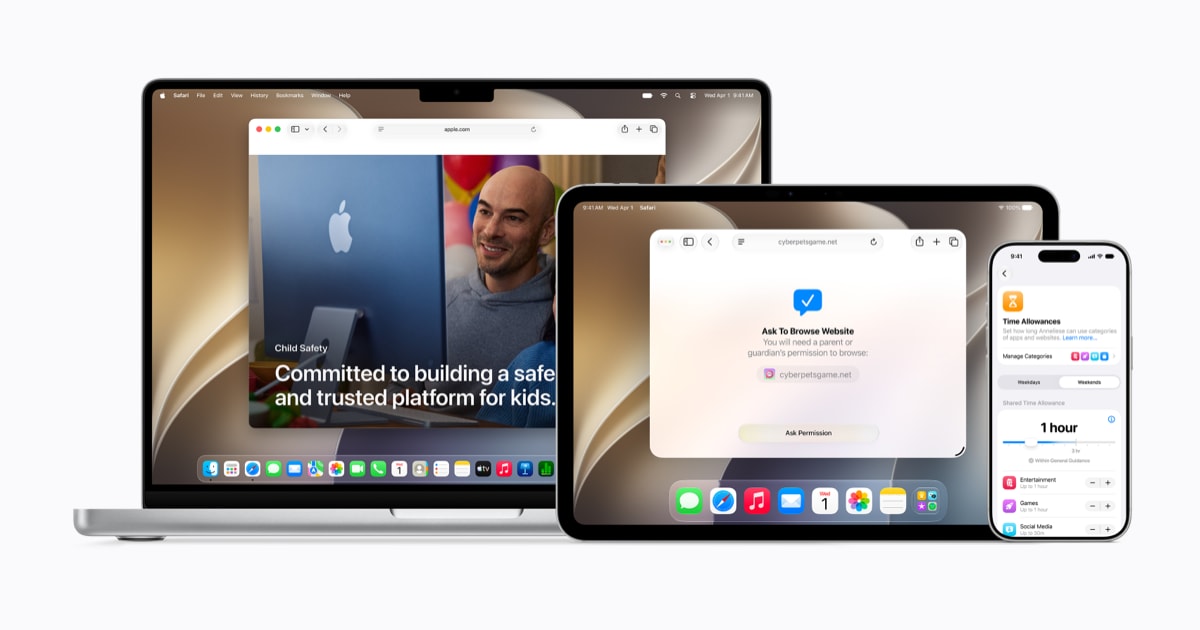
If you are a parent asking, “Will Apple’s new iOS 27 child safety features actually make managing my kid’s iPhone easier,” the answer is yes, but only if you plan to re-check your family settings when iOS 27 arrives. Apple is adding tools that are designed to reduce the constant negotiation loop, especially around web access and time limits. The biggest win is not a single new toggle, it is a shift toward more structured, permission-based workflows that can cut down on workarounds and argument fatigue.
Apple’s headline additions include a new Ask to Browse flow for Safari requests and a redesigned Screen Time experience with Time Allowances. In plain English, Apple is trying to make “yes, but…” parenting easier, instead of forcing you into “always yes” or “always no” rules that kids inevitably push against.
The angle that matters for buyers and owners
These changes are less about buying a new iPhone and more about making the iPhones and iPads you already own less stressful to manage in a family. If Screen Time has felt brittle for you in past years, this is Apple acknowledging the problem. The practical question is not whether iOS 27 has new parental controls. It is whether they reduce the number of times you have to stop what you are doing to play referee.
What changed, in practical terms
Ask to Browse targets a specific pain point: kids requesting access to a website that is blocked by default settings. The old pattern was usually a messy mix of turning a restriction off, adding a site to an allow list, then hoping you remembered to reverse it later. A request-driven workflow is cleaner because it is explicit, time-bound in spirit, and easier to reason about after the fact.
Time Allowances are the other meaningful move. Parents rarely think in terms of individual apps anymore. Kids move between groups of apps that serve the same purpose. Messaging, social, video, games, reading. A category-style allowance is closer to how households actually set rules, and it is more resilient when a child installs a new app to dodge a limit.
The hidden tradeoff is setup debt
When Apple redesigns family controls, it usually creates a short-term problem: you can end up with settings that technically carried over, but no longer reflect your intent. Rules that used to be “good enough” become confusing once the UI and categories change. That is not Apple being sneaky, it is the cost of evolving a system that has to serve radically different family situations.
So the real advice is to treat iOS 27 like a fresh season. When you update, schedule 20 minutes to review three areas: Safari and content restrictions, Screen Time limits by category, and who your child can communicate with. If you do that once, you are far more likely to benefit from the new workflows rather than being surprised by them.
Who should care most
If you have a child in the 8 to 15 range, these changes are likely to land hardest for you. That is the age where device use becomes more independent, school communication ramps up, and social pressure starts shaping app choices. Families with younger kids may already be using stricter blocks, and families with older teens often move toward negotiated norms instead of hard limits. iOS 27 is aimed at the messy middle.
Verdict
Apple’s iOS 27 child safety push looks like a real quality-of-life upgrade for families, not a checkbox feature. The catch is simple: plan to revisit your setup when iOS 27 arrives. If you do, you will likely spend less time micromanaging and more time enforcing clearer rules with fewer loopholes.
Related reading: Best iPhone for Camera Buyers, iPhone 16 vs. iPhone 16 Pro, Should some buyers skip the iPhone 16 Pro?.