
Buyers should treat Apple HomeView as a Siri AI appliance first, and a “smart home screen” second. My opinionated, falsifiable take is this: if Siri AI is not already working well for you on your iPhone today, HomeView will disappoint you more often than it delights.
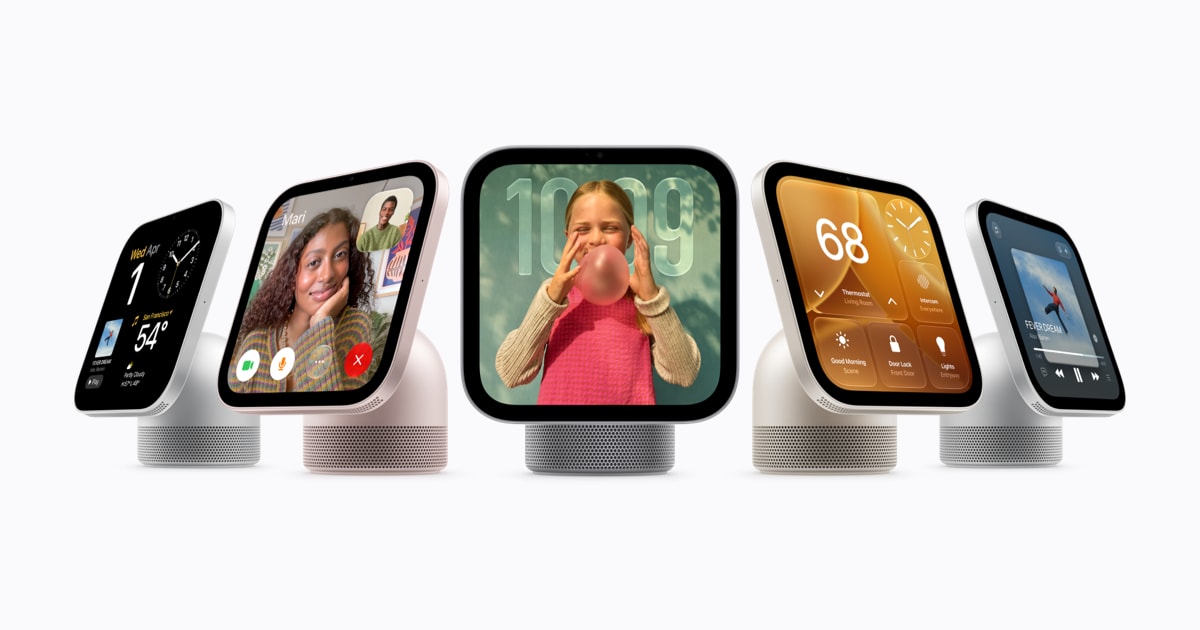
Apple’s own pitch is clear. HomeView is “powered by Apple Intelligence with Siri AI” and is designed to blend entertainment, FaceTime, and home control on a 7-inch display. That means your decision is not really about screen size or where it sits on the counter. It is about whether you want to make Siri AI the interface to your household. Apple announced HomeView on October 13, 2026 in its Newsroom release Meet Apple HomeView.
Primary question: should you buy HomeView if you already have an iPad and Home app accessories?
For most people, no. If you have an iPad that already lives in the kitchen, and you are mostly using Home to tap buttons for lights, locks, and cameras, HomeView is not automatically an upgrade. The reason is simple. Apple is positioning HomeView as the always-available Siri AI endpoint for the home, not just a bigger Home app.
HomeView is built to be a shared device. It supports FaceTime with Center Stage and voice replies to Messages, plus Intercom across rooms. Apple also frames it as an entertainment hub for Apple Music, Apple Podcasts, Apple News, and Apple TV, including Handoff from iPhone. All of those are real conveniences, but they are not the reason to spend money. Apple’s own description makes the center of gravity obvious in the first line: HomeView is powered by Apple Intelligence with Siri AI.
So the right buying test is not “do I want a screen in my kitchen.” It is:
- Do I want Siri AI to be the default way my household controls the home and asks questions?
- Do I want an always-on, shared device for calls, messages, and home status that is tied into my Apple ecosystem?
If your answers are not both yes, keep your iPad and tighten your Home setup instead.
The hidden tradeoff: your smart home now has a dependency chain
We have said this before on Church of Apple in different words, and the same advice we gave for recent point updates applies here: the Apple home experience gets fragile when your “one device that must be current” is not actually current.
HomeView pushes that reality into the spotlight. Apple is openly tying key functionality to Siri AI availability, regions, and supported languages. For example, Apple says Siri AI on HomeView is available in English in a list of countries including the U.S. and the UK, with Canadian French support coming later via a software update. That is a normal rollout pattern, but it is also a warning label that the product’s headline value depends on ongoing software availability and language coverage. This is in Apple’s HomeView release notes section in the Newsroom post.
There is an even sharper example in the companion Home accessories announcement. Apple says Apple HomeView is not available for sale in the European Union because Siri AI is currently unavailable in iOS in the EU. Even if you live in the U.S., that tells you what the product really is: it is a Siri AI terminal that happens to do Home, not a Home terminal that happens to do Siri.
Practical takeaway: if you buy into HomeView, you should also budget attention for the boring parts. Keep the household “home owner” iPhone updated, keep Siri AI enabled, and keep language settings aligned. Otherwise you will own a nice screen that constantly falls back to dumb mode.
Who should wait, and who should buy
Wait if any of these are true:
- You still do most Home control manually, because voice control has been unreliable in your home.
- Your household’s iPhones are a mix of old models, old iOS versions, or multiple Apple IDs that make Home ownership messy.
- You are hoping HomeView will fix HomeKit reliability issues caused by Wi‑Fi coverage, accessory firmware, or bad automations.
Buy if these are true:
- Siri AI already works well for you on iPhone, and you want that same interaction model shared in a room.
- You want a dedicated, shared place for FaceTime and Intercom that is not somebody’s personal iPad.
- You like Apple’s privacy-first pitch for the home and want an Apple-first alternative to Echo Show and Nest Hub style devices.
One more buyer reality check: Apple is moving the smart home story toward an Apple-designed stack. The HomeView announcement, the new HomePod mini 2, and the new Apple Home Collection accessories are meant to reinforce each other. Apple is explicit that these accessories are “managed through the Apple Home app” with no separate app or account required, and that Home data is encrypted end to end. That is good. It is also lock in by design, and it is described directly in Apple’s Home Collection release Introducing Apple Home Collection.
Verdict: HomeView is worth buying only if you are ready to treat Siri AI as the core interface for your home and you have already proven, on your iPhone, that Siri AI works the way you want. If you are still fighting voice control, spend zero dollars and fix your home network, your Home ownership setup, and your automations first.
Sources: original report
Related reading: Best iPhone for Camera Buyers, iPhone 16 vs. iPhone 16 Pro, Should some buyers skip the iPhone 16 Pro?.