
If you are wondering whether Apple’s new “monthly with a 12-month commitment” App Store subscriptions are good for you, the practical answer is this: they can be useful when you already know you will keep an app for a full year, but they also make it easier to accidentally commit to 12 months of payments when you thought you were choosing a normal monthly plan. My verdict is to treat this option like a contract, not a discount. If you cannot commit to a year, skip it and choose either true monthly or prepaid annual.
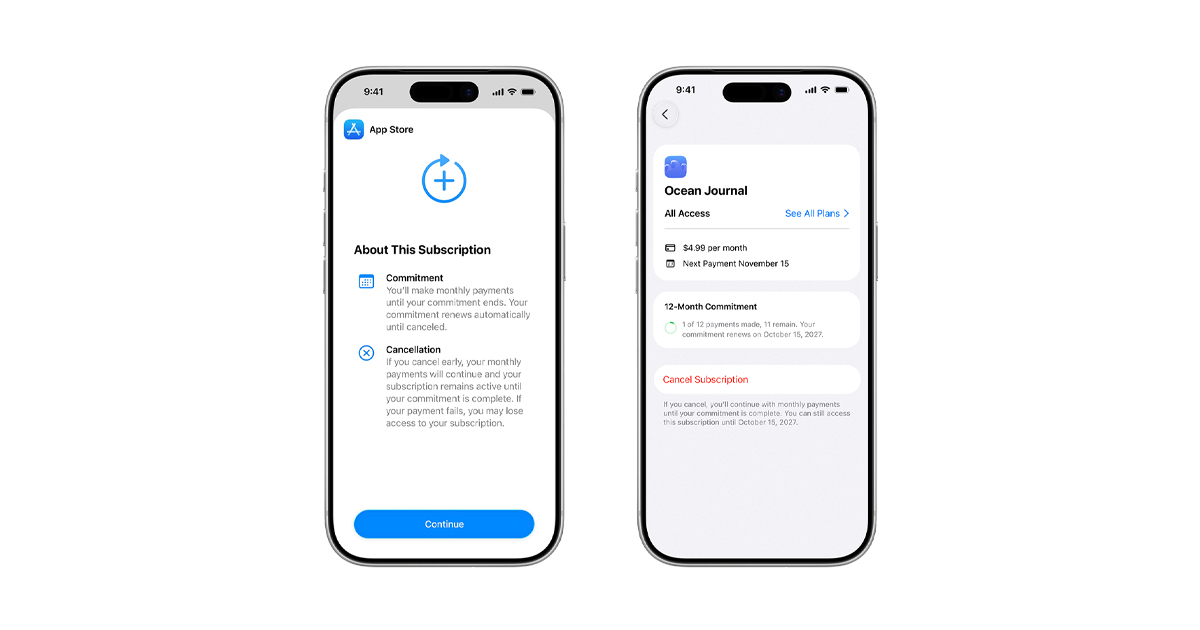
Apple just announced this new subscription type for developers, and it is scheduled to become available in May alongside iOS 26.5 and Apple’s other platform updates. Apple says people will be able to see how many payments are completed and how many remain in their Apple Account, which is helpful, but it does not remove the core issue: the billing cadence is monthly, the obligation is annual.
Here is what Apple is really changing. Until now, most apps gave you a simple choice: pay monthly and stay flexible, or pay annually and commit up front, usually at a lower effective monthly price. The new middle option is designed to remove the up-front cost barrier while keeping the commitment. You can pay the annual price in 12 installments. That sounds consumer-friendly, and for some people it will be, but it also reshapes how subscription menus will be designed.
The buyer risk is not that Apple invented lock-ins, it is that the interface now has another option that feels like “monthly,” even though it behaves like “annual.” Many customers do not read subscription fine print until they try to cancel. If an app’s paywall presents three choices, it is easy to imagine the “12-month monthly” option being positioned as the smart default, with the true monthly plan priced high enough to feel punitive.
Who should consider this option. If you already buy annual plans because you rely on a service, think password manager, workout plan, pro camera app, language learning, or a serious note taking tool, this could be a cash flow improvement. You keep the annual value pricing, but you do not have to drop a large amount all at once. For students or families budgeting month to month, that is real utility.
Who should avoid it. If you are testing an app, bouncing between alternatives, or using something seasonally, this is the wrong plan. It is also a bad fit if you are subscribing inside an app because you need one feature today. That is the moment most people misjudge long-term value. In those cases, pay the higher true monthly rate for one or two months, then decide whether the app earned a longer commitment.
Three checks to do before you subscribe. First, confirm the plan label clearly indicates a 12-month commitment, not just a monthly price. Second, look for the total annual cost and compare it to the prepaid annual option, if both exist. You want to know whether you are actually getting annual pricing, or just getting locked into a new pricing tier. Third, decide what your personal “cancel test” is. If you would likely cancel within 90 days, do not choose a 12-month commitment plan, even if the monthly number looks good.
One more practical takeaway for developers and power users. Apple is making “commitment length” more granular, and that almost always leads to more segmentation in pricing strategies. Expect more apps to push users toward longer commitments by making true monthly plans feel expensive. That can still be fair if the value is there, but it increases the importance of evaluating subscriptions like any other purchase. What problem does the app solve, and would you keep paying for it after the novelty wears off.
Conclusion: this new App Store option is not automatically a win or a loss. It is a contract-style subscription disguised in a monthly suit. If you already know the app is part of your life for a year, it can be a sensible way to lower the up-front hit. If you are unsure, choose flexibility and pay true monthly until the app proves it deserves a longer commitment.
Related reading: Best iPhone for Camera Buyers, iPhone 16 vs. iPhone 16 Pro, Should some buyers skip the iPhone 16 Pro?.