
Ok friends, if you keep your MacBook plugged in all day like a little desktop gremlin (same), Apple is finally tossing us a real bone.
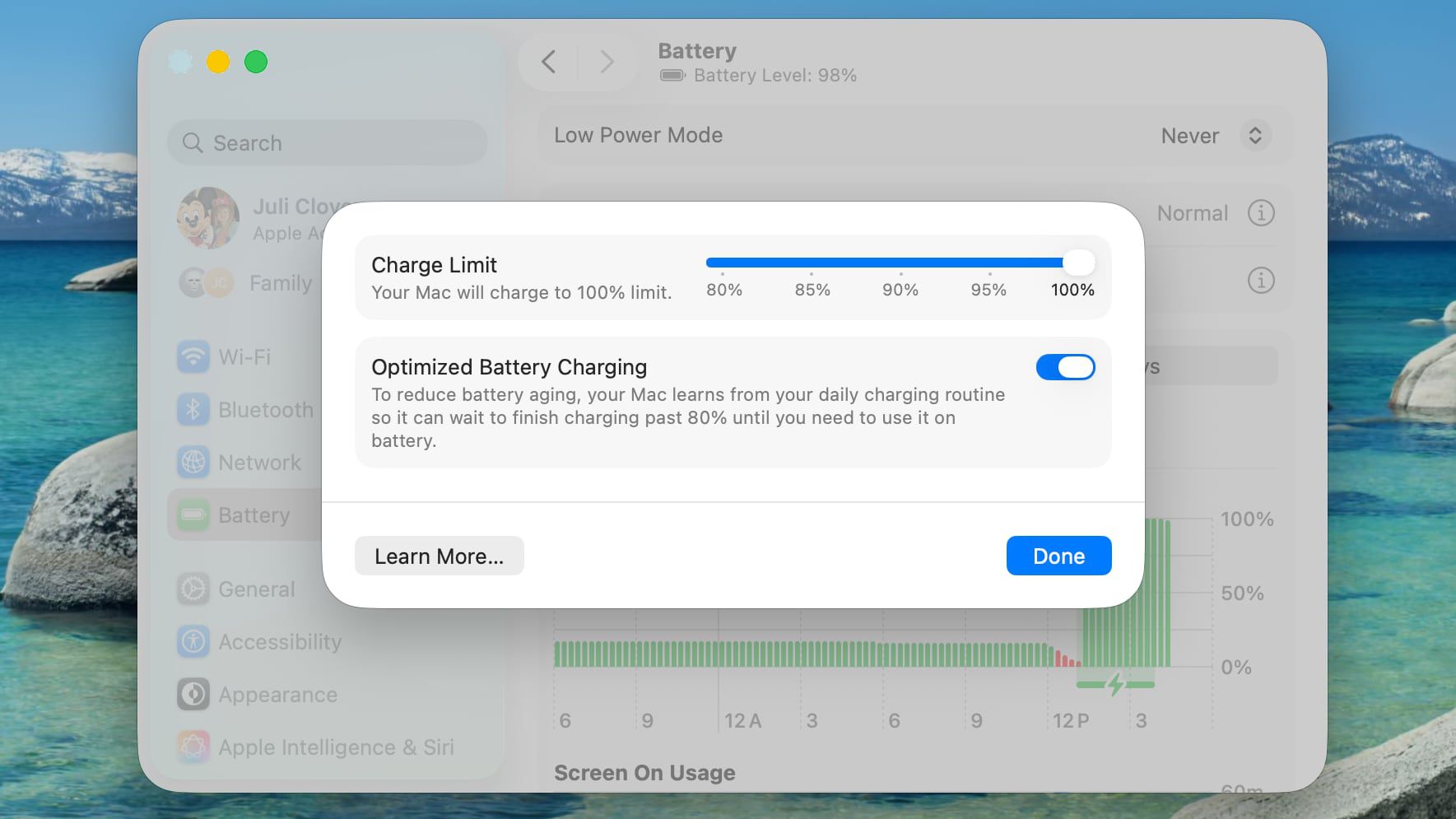
macOS Tahoe 26.4 is adding an actual Charge Limit setting, the iPhone-style kind, so you can cap your MacBook’s battery at something like 80% instead of letting it marinate at 100% forever.
And yes, this is the kind of tiny, practical feature that makes you say, “Wait, why did this take so long?” Because it’s not flashy, but it’s the stuff you feel every single day.
According to the details, you’ll be able to enable Charge Limit from System Settings, then Battery, then hit the little info button next to Charging. From there, you pick your max charge, and your MacBook plays nice.
My take, if you’re the type who leaves your Mac docked most of the week, this is a sneaky big quality-of-life win. It’s like Apple quietly admitting we all use our laptops like desktops now, and they’re adjusting the rules accordingly.
Also, I love the vibe of “your Mac is now borrowing the iPhone’s best habits.” Responsible charging, we love to see it.
Also useful: if you are comparing Macs, start with our Mac buying guide hub for workload-based recommendations instead of launch-day hype.